ExtrusionPower
MODULE 02 — CAE

Validate the die before the first billet is pressed

How many trials in are you?

ExtrusionFlow simulates metal flow, pressure, temperature distribution and die stress inside the die, letting you catch balance, deformation and weld-line problems on the 3D model before cutting any metal.

Performance

Minutes on screen, not days on the press

A full flow, thermal and stress simulation on a typical die completes in about 30 to 40 minutes, though highly complex or multi-cavity dies can take a little longer.

30–40 min
TYPICAL SOLVE TIME
4
ANALYSIS TYPES
Calculation Types

Four simulation types on the same 3D die model

✓Flow analysis: velocity distribution across the die exit and pocket balance
✓Stress analysis: von Mises stress and deflection under press load
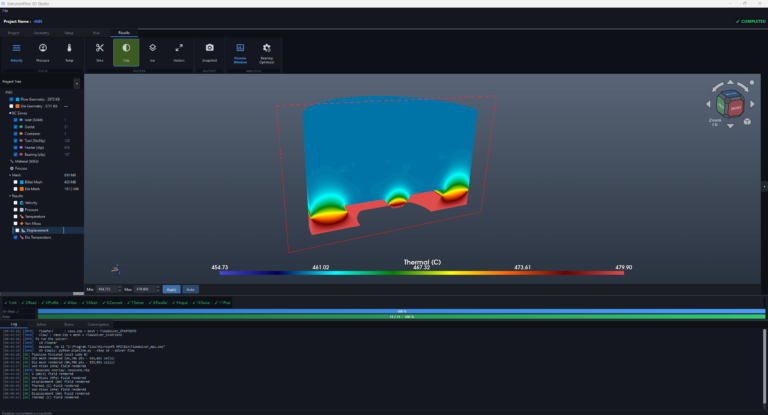
✓Thermal analysis: temperature distribution through the die during extrusion
✓Deformation analysis: bearing and pocket deformation prediction
Die Optimization

Balance the die on screen, not on the press

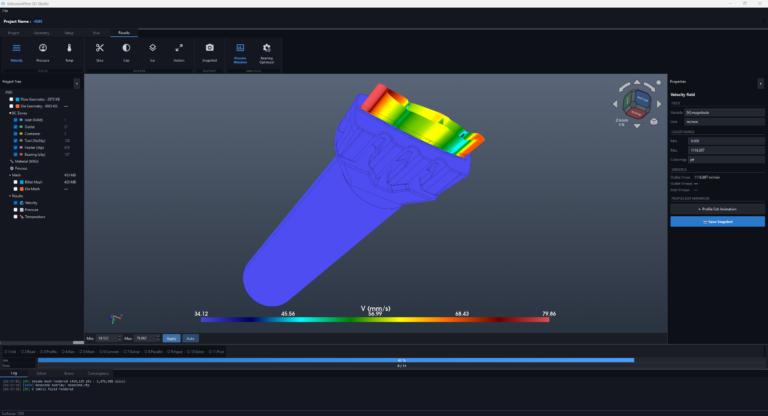
ExtrusionFlow highlights exactly where flow velocity is uneven across pockets, so bearing lengths can be corrected before the physical trial. The same 3D model used by Extrumat feeds directly into the simulation, with no re-modeling and no format conversion.
  • ✓ Bearing-length correction suggestions from velocity results
  • ✓ Side-by-side comparison of design revisions
  • ✓ Direct feedback loop into Extrumat's 3D model
  • ✓ Simulate with designer-defined or constant bearings, or calculate bearing lengths with the Automatic Bearing Calculator
ExtrusionFlow velocity field simulation
Product Quality & Inspection

Catch quality issues while they're still on screen

✓Weld-line location and strength prediction
✓Surface-finish risk zones from flow non-uniformity
✓Dimensional deviation from die deflection
✓Comparison against tolerance targets before trial
ExtrusionFlow thermal analysis
Material Database

Real alloy behavior, not generic assumptions

Simulations run against a database of real aluminium alloy flow-stress and thermal properties, so results reflect the actual billet material rather than a generic aluminium approximation.

Deeper Analysis

What the metal went through inside the tooling

Beyond the basic fields, the solver reports what happened to the metal on its way out, and what that does to the section once it leaves the die.

✓Deformation history: strain rate, flow stress, accumulated strain and the Zener–Hollomon parameter through the tooling, so you can see how hard the metal was worked
✓Seam weld analysis (optional): track which porthole each metal stream came from, locate the seams where they meet, and rate them by the pressure–time accumulated through the welding chamber
✓Profile deflection: turns exit velocity imbalance into the shape it produces, giving how far the profile bends per metre of run-out and in which direction, cavity by cavity
✓ExtrusionFlow Share: send the result to your customer without sending the die. The package holds only the profile downstream of the die exit, so bearing lengths and pocket geometry cannot be read from it, and your customer opens a link in a browser with nothing to install
✓Virtual trials: compare design variants numerically and pick the best one before any steel is cut
✓Longer die life: fewer corrections mean less nitriding, less rework and longer service life for die set components
Questions It Answers

The questions usually asked at the press, answered on screen

  • ✓ Is the profile balanced?
  • ✓ Where is the die overstressed?
  • ✓ How much will the tool deflect?
  • ✓ What bearing lengths are right?
  • ✓ Will the section hold tolerance?
  • ✓ Where do the seams form and how strong are they?
  • ✓ Which way will the profile bend on the run-out table?
Outputs
Flow
Velocity, pressure, temperature, strain rate, flow stress, accumulated strain, Zener–Hollomon
Die
von Mises, max shear, max principal, displacement, die temperature
Profile
Deflection per metre, direction, per cavity
Optional
Seam weld location and strength
Also Included

The details that make simulation part of the daily job

  • ✓ 12-language interface, 12-language reports
  • ✓ Press library with automatic capacity check
  • ✓ Project wizard derives parameters from geometry
  • ✓ Prepare Die: flow volume, die and bearing curves from a single assembly STEP file
  • ✓ Multi-cavity dies, automatic solid/hollow detection
  • ✓ Process window and extrusion calculator
At a glance
Role
3D process simulation
Physics
Flow, thermal, structural
Setup
Minutes, inside ExtrusionPower
Solve time
≈ 30–40 min typical
FAQ

Common questions about ExtrusionFlow

Q01 What does ExtrusionFlow simulate?+

Metal flow velocity, pressure, temperature distribution and die stress/deformation, all on the actual 3D die model, before any physical trial.

Q02 Does it replace the physical die trial entirely?+

It replaces most of the trial-and-error: major balance, deformation and weld-line issues surface on screen first, so the physical trial becomes a confirmation step rather than a discovery process.

Q03 Does ExtrusionFlow work with the model created in Extrumat?+

Yes. The same 3D model flows directly from Extrumat into ExtrusionFlow, with no re-modeling or file conversion needed.

Q04 How long does a simulation take?+

A full flow, thermal and stress simulation on a typical die completes in about 30 to 40 minutes: a virtual die trial rather than a multi-day physical one.

Q05 What material data does the simulation use?+

A built-in database of aluminium alloy flow-stress and thermal properties, so results reflect the real billet alloy rather than a generic material model.

Q06 Can I show the result to my customer without giving away the die?+

Yes, that is what ExtrusionFlow Share is for. The package it builds holds only the profile downstream of the die exit, so bearing lengths and pocket geometry cannot be read from it. Your customer opens a link in a browser and nothing has to be installed.

See your die's flow behavior before the trial

Request a demo to run a simulation on your own die geometry.

Try it with your own drawing →
